The ASUS Crosshair III Formula isn't a new kid on the block but that hardly means it's old news. This third version of ASUS' top AMD motherboard is a vast departure from the previous versions in that it no longer uses an Nvidia chipset to provide SLI. ASUS has jumped on the Dragon platform train by using AMD's 790FX chipset and providing two PCIe 2.0 x16 slots with CrossFire functionality. I have mixed feeling about this as I'd love to see SLI on a top-end AMD socket AM3 motherboard, but 790FX with SB750 brings so much goodness to the table that it is with only fleeting sadness that I unboxed this board. I've always enjoyed the Republic of Gamer products from ASUS and the Crosshair III Formula delivers on nearly all accounts.


Asus Crosshair III Formula 790FX Motherboard Image

The Crosshair III Formula essentially takes the 790FX M4A79T-Deluxe pcb and tweaks it a bit while adding additional features and bumping the quality in the components. Like all Republic of Gamer boards the Crosshair III Formula comes with an add-in audio module providing cleaner sound. There is also the LCD Poster which provides diagnostic information and a menu for browsing through the options provided in TweakIt. TweakIt is a hardware supported overclocking feature that lets you adjust all the BIOS settings on the fly. This can help all overclockers push their systems to the edge of stability. Before we dig into the board images and tests here's a list of the features on the board.

CPU

  • AMD Socket AM3 ;Phenom II /Athlon II /Sempron 100 Series Processors
  • AMD 140W CPU Support
  • AMD Cool 'n' Quiet Technology
  • Supports 45nm CPU

Chipset

  • North Bridge: AMD 790GX
  • South Bridge: AMD SB750

Memory

  • Dual-channel DDR3 memory architecture
  • 4 x 240-pin DDR3 DIMM socket support up to 16GB
  • Supports DDR3 up to DDR3 800/1066/1333/1600
  • Supports ECC and non-ECC un-buffered memory modules

Expansion Slot

  • 2 x PCI Express Gen 2.0 x16 slots
  • 3 x PCI Express x1 slots
  • 1 x PCI slots

Storage

  • Support by AMD SB750
  • 5 x Serial ATAII 3.0Gb/s devices
  • RAID 0/1/5/10/JBOD
  • 2 x IDE Ultra DMA 66/100/133
  • 1 x eSATA

Audio

  • SupremeFX X-Fi Audio Card featuring 8-Channel Audio Codec
  • EAX Advanced HD4.0
  • X-Fi Crystalizer
  • Supports 1x S/PDIF output
  • Supports Coaxial/Optical S/PDIF output

Rear Panel I/O

  • 1 x PS/2 keyboard or PS/2 mouse connector
  • 1 x RJ45 LAN connector
  • 1 x eSATA
  • 6 x USB ports
  • 1 x FireWire 800
  • 1 x Clr CMOS switch

Internal I/O

  • 1 x 24-pin ATX Power Supply connector
  • 1 x 4-pin ATX 12V Power Connector
  • 8 x 4-pin fan connections
  • 1 x Power on button
  • 1 x Reset button
  • 1 x IDE connector
  • 3 x thermal sensor connector
  • 1 x Front panel switch/LED header
  • 5 x Serial ATA 3Gb/s connectors
  • 3 x USB 2.0 headers supporting 6 additional ports
  • 1 x IEEE1394 header supports 1 additional port
  • 1 x LCD POSTER port

Form Factor

  • ATX Size, 305mm*245mm
  • 9 mounting holes

Warranty

  • 36 months on parts
Source:legitreview

As an enthusiast, when you hear the name Zalman you have a good idea what the cooler will look like without even seeing it. Since the late 90’s Zalman has been putting out quality coolers that not only perform well but have a look unlike the rest of the pack; tower coolers are all barrel shaped and the down draft coolers are round. Their coolers are almost always copper, with aluminum fins and a zinc coated copper here and there. Now we get a look at one of Zalman’s newest offerings the CNPS 10X Extreme CPU Cooler. It’s a more traditional square upright tower cooler design, and like all of Zalman’s coolers, it looks good.

Zalman CNPS 10X Extreme CPU Cooler

Features

  • Powerful Cooling Performance: Optimally designed aluminum fins disperse heat away from the CPU via 5 heatpipes, while the high capacity 120mm fan quickly cools the heatsink for stable operation of high performance CPUs.
  • PWM Fan with Auto/Manual Control: Includes PWM Mate, the world’s first RPM controllable PWM fan speed controller, with the options of 3-Speed Auto or Manual Control Modes. PWM Mate can be installed on the case’s exterior by connecting with the included Extension Cable.
  • Ultra Quiet 120mm Blue LED Fan: Switching noise is eliminated by the 120mm fan incorporated for ultra quiet operation and Blue LEDs for cool aesthetics. ‘Switching noise’ is the high frequency harmonic noise that can result from voltage regulation.
  • Black-Pearl Nickel Plating: The entire heatsink of CNPS10X Extreme is “Black-Pearl” Nickel Plated for long-term corrosion resistance, while the deep “Black-Pearl” tone along with the high intensity Blue LEDs reinforce its powerful aesthetics.
  • High Performance Super Thermal Grease ZM-STG2: The included all new high performance thermal grease ZM-STG2 maximizes heat transfer from the CPU to the base of CNPS10X Extreme for intensified cooling performance.
  • Versatile Compatibility: CNPS10X Extreme accommodates a broad range of sockets: Intel LGA1156/1366/775 and AMD AM3/AM2+/AM2/754/939/940.

Specifications

  • Dimensions: 135(L) X 100(W) X 160(H)mm
  • Weight: 920g
  • Materials:
    • Fins: Aluminum
    • Base: Copper
  • Dissipation Area: 8,544㎠
  • Heatpipes: 5 x U-shaped heatpipes
  • Fan:
    • PWM 120mm Blue LED Fan
    • Fan RPM: 1,000 - 2,150rpm ± 10 %
    • Noise: 20.0 - 39.0dBA
    • Fan Bearing: 2 Ball-Bearing
    • Nominal Fan Voltage: 12V Fan
    • MTBF: Over 50,000 hrs
  • PWM Fan Control (PWM Mate)
    • PWM Duty Cycle(Fan Speed Control Range): 25 - 100% ± 5%
    • Connector Type: 4-Pin only
  • Thermal Paste
    • Color: Gray Specific
    • Gravity @23*C: 2.88
    • Thermal Conductivity: 4.1 W/mK
    • Temperature Stability: -40°C ~ +150°C (-40? ~ +302?)

Retail Packaging

Zalman CNPS 10X Extreme box

The CNPS 10X Extreme comes in a nice looking package with all the specifications and features listed on the box.

Zalman CNPS 10X Extreme packing

Inside the box the cooler is well protected in a plastic clam shell.

Source:.legitreviews


Intel, along with Kingston and Asus held a web cast yesterday to better explain a new concept called XMP, which simply stands for Extreme Memory Profiles. The technology is designed to give the new and amateur overclocker the confidence that is needed to properly overclock his computer with compatible hardware that will guarantee a certain level of overclocking with DDR3 modules that are XMP compatible. It also allows the enthusiast the opportunity to fine tune things even more and set their DDR3 modules to automatically start up a system in an overclocked state using one of two profiles that are available in the SPD of the modules. Let’s take a closer look…

Intel XMP Overclocking

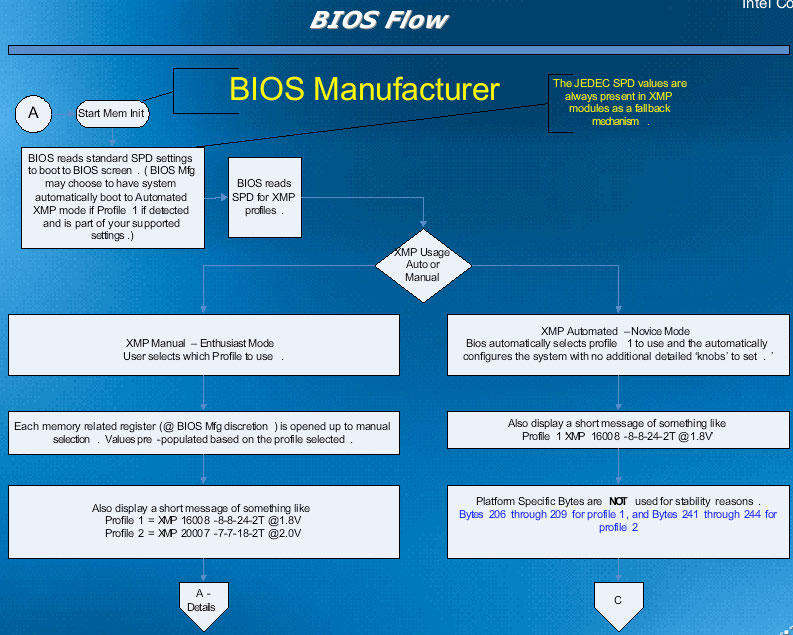
As you can see from the slide, the profiles for the overclocked DDR3 modules are stored in the SPD of the DIMM. As the computer boots, the BIOS detects the program in the SPD and automatically adjusts settings to overclock the DDR3 modules, as well as other settings that may need to be adjusted, such as the FSB, vdimm and vcore among other settings. It also allows for the timings on your DDR3 modules to be adjusted as needed. Let's take a more detailed look at this.

Intel XMP Overclocking

Intel XMP Overclocking Work Shop

These screens give you a little better picture of what happens as the computer boots. It is able to start at JEDEC defined standards to ensure compatibility. You also have the option to boot at parameters that are specified in the XMP profile space in the SPD of the modules. This is activated by a setting in the BIOS, or through a setup utility. The modules that come with the XMP certification will be guaranteed to run at speeds that are well above the JEDEC standards. This is accomplished by pairing the XMP DDR3 modules with other hardware that is also XMP certified.

Intel XMP Overclocking


Each DIMM manufacturer will be responsible to self-certify its parts with motherboard manufacturers and will be responsible to provide the results to Intel, who will then post an XMP compatibility chart on its website, so that the end user can have confidence that the parts that he is choosing will be a perfect fit, and give him the best chance at a maximum overclock of his system. Intel says that it will periodically perform audits on the parts to make sure that quality and compatibility are maintained.

With the announcement of this technology, Kingston and ASUS both revealed parts that either are or soon will be XMP certified.

Intel XMP Overclocking


Kingston currently has its DDR3-1625 part that is XMP certified, and will soon be releasing an 1800mhz part.

Intel XMP Overclocking


ASUS also showed off the very first motherboard to support XMP in that the P5E3 Deluxe WiFi. ASUS also said that XMP will be a part of all of their future high end series of boards.

Conclusion:

XMP basically does three things:

  1. It ensures compatibility between DDR3 modules and the motherboards they will be working in.
  2. It allows the novice or new overclocker to have some security in their new venture into overclocking by providing a certain level of guaranteed success.
  3. It allows the enthusiast to be able to set their DDR3 modules to a confirmed setting that the can easily and quickly switch to for maximum performance at any given time.
Source:legitreviews


Last month, Kingston Technology announced the release of a high-performance, low-latency 800MHz DDR2 fully-buffered dual-inline memory modules (FB-DIMMs). This memory kit should look familiar to our readers as we showed you the prototype heat sink last year at the Intel Developer Forum. These modules were built to run on the Intel 5400 chipset, which is the chipset used on the Intel Skulltrail platform. We first spotted the super fast Intel Skulltrail platform at IDF last year and finally got one to benchmark on our test bench in February of this year. The performance numbers of the system were stellar, but it did and still does have a weakness and that would be the memory picked for the system. Intel went with FB-DIMMs on the D5400XS workstation motherboard and while the board was one of the first to support quad channel memory the press kits were sent out with dual channel memory kits. This actually impacted performance, but at the time 800MHz FB-DIMM memory kits were still in development and very expensive. If that wasn't bad enough, FB-DIMM memory kits run very hot since they have a controller IC on each module. Early adopters of the platform didn't have too many memory choices when it came to this expensive enthusiast platform, but where there is demand, a product will arise.

Kingston HyperX 800MHz FB-DIMM

Kingston Technology has been developing FB-DIMM memory kits from day one, so it was no shocker when they announced a HyperX part that was unlike any other module on the market. Kingston used a single U-shaped heat pipe to cool the FB-DIMMs' controller IC. To help transfer the heat away from the heat pipe they then employed a set of nine cooling fins dissipate the intense heat from the controller IC.

Kingston HyperX 800MHz FB-DIMM

Each module has the SPD timings set to 5-5-5-18 with 1.8V on bootup, but the timings may be tightened to 4-4-4-12 with a voltage increase (2.0V). Increasing the voltage on FB-DIMM modules used to be something only dare devils would do, but since the Kingston HyperX FB-DIMMs use an improved heat sink it can now be done safely. For those that want to push the limits with low latency timings we were able to reach 3-4-3-12 timings with full stability with 2.1V. At these voltages you will want to make sure the memory modules have a fan blowing across them!

Kingston HyperX 800MHz FB-DIMM

The Intel D5400XS motherboard has four memory channels that can handle up to 16Gbytes in four fully buffered DIMMs (FBDIMM). FBDIMMs provide better signal integrity but with slightly more latency and are required in most server environments and high-end workstations. In theory, they can provide improved bandwidth over their non-buffered counterparts.

Kingston HyperX 800MHz FB-DIMM

The Kingston 800MHz HyperX FB-DIMMs are significantly taller than standard FB-DIMM memory modules. This can be seen in the above image as the module in front is a standard Samsung 800MHz FB-DIMM memory module with a traditional heat spreader. The Kingston 800MHz HyperX FB-DIMMs are taller and thanks to the innovative cooling system, they can be used together without blocking airflow to the other memory modules cooling fins.

Kingston HyperX 800MHz FB-DIMM

We were curious what memory IC's were under the heat spreader, so we pulled off the clips and found Elpida branded memory chips with the part number E5108AJBG.

Source:legitreview


Even though the formal release of the AMD 785G chipset is not set to occur until sometime in August, the first 785G motherboards have been shipping to retailers for weeks and one managed to find its way to our front door here at Legit Reviews. Today, we have the ASUS M4A785TD-V EVO motherboard to take a peek at. This socket AM3 motherboard uses the AMD 785G and SB710 chipsets and is packed full of features that one wouldn't expect on an entry level AMD motherboard that will range from $70-$90 if the price leaks are correct.
ASUS M4A785TD-V EVO Motherboard Box

For starters, the AMD 785G platform will be the first to feature highly anticipated ATI Radeon HD 4200 Graphics, which means that DirectX 10.1 gaming performance will be coming to IGP mainboards. That means that the AMD 785G platform will have better video performance than the AMD 780G chipset, which uses ATI Radeon HD 3200 Graphics. The title of being the world's fastest motherboard GPU still belongs to the ATI Radeon HD 3300 Graphics on the AMD 790GX motherboards, as the second number in AMD's IGP nomenclature dictates the performance level. That is why the Radeon HD 3300 is faster than the Radeon HD 4200.

ASUS M4A785TD-V EVO Motherboard Retail Bundle

Inside the retail box one will find the bundle that comes with the ASUS M4A785TD-V EVO motherboard. ASUS includes four Serial ATA cables, one Ultra DMA 133/100/66 cable, the I/O shield, Q-Connectors, user manual, motherboard support DVD and a case badge. The ASUS Q-Connectors allow you to hook up the front panel connectors to the supplied removable plug and then connect this plug onto the motherboard. This is a life saver when assembling a system down in a case where space and light is at a minimum. The I/O panel is just the standard stamped metal one, which is a bummer as we really like the ASUS Q-Shield version that is designed to decrease any electromagnetic interference from escaping out of or into the chassis through this area. It seems ASUS is planning on leaving that as a feature on their higher-end products.

ASUS M4A785TD-V EVO Motherboard AMD 785G

As you can see from the image above the ASUS M4A785TD-V EVO is a full size ATX motherboard that features the AM3 processor socket by AMD. The M4A785TD-V EVO uses Stack Cool 3+ and is part of the Xtreme Design initiative that ASUS is currently promoting. The board has a very clean layout and features an 8+2 phase power design. AMD and ASUS asked us not to go into any more detail than what can be seen from pictures of the board, so we can only give you a brief overview of the M4A785TD-V EVO. This motherboard features SidePort Memory, which is an individual on-board DDR3 chip that acts as a memory buffer for the integrated Radeon 4200 graphics. Since the board has the Radeon 4200 graphics on-board it also sports ATI Hybrid CrossFireX technology.

ASUS M4A785TD-V EVO Motherboard PCIe Slots

Expansion capabilities come in the form of three PCI slots, one PCI3 x1 slot and two x16 PCI-E 2.0 slots for those looking to run video cards in an ATI CrossFire configuration. It should be noted that the blue PCIe 2.0 slot x16 operates at x16 mode and the gray PCIe 2.0 slot operates at x4 mode.

ASUS M4A785TD-V EVO Motherboard I/O Panel

The back I/O panel offers plenty of connectivity. The board features a single purple PS/2 combo port and a total of six USB 2.0 ports available on the I/O panel with more available on the board itself. Additional connectivity includes an optical S/PDIF port, a single eSATA port, a single IEEE 1394a Firewire port, a single RJ-45 Gigabit LAN port and the eight channel surround sound ports. When it comes to video connections you have the 15-pin VGA port, DVI-D port and the HDMI port. This motherboard is fully HDCP compliant, so it should be ideal for Blu-Ray playback or for any other protected content.

ASUS M4A785TD-V EVO Motherboard 785G Chipset Heatsink

The heat sink on the AMD 785G chipset is impressive looking with a twin color design that looks like something from the orient. The days of boring old cookie cutter heat sinks have been long gone, but it is still amazing that designers keep coming up with new and innovative cooling solutions.

Source:.legitreviews


Over the weekend I was looking around at various forums and some readers on Corsair's House of Help Forum were asking Corsair if running 12GB of DDR3 memory on an Intel Core i7 platform was possible. The answer from the staff over there was it is possible and a couple people have shown it done. With many enthusiasts getting into photo editing using CS4 and more people starting to edit HD movie content this subject that will come up more as time goes on. Since I have some matching Corsair 6GB triple channel memory kits I figured why not give it a shot this weekend to see what would happen, if anything, and answer some questions about running 12GB of memory. The results from tinkering around with 12GB of memory on a Core i7 platform was more than impressive, so sit back and read along about my journey of going to 12GB of system memory.

Two Corsair Dominator DDR3 1866MHz 6GB Memory Kits

Armed with two Corsair DOMINATOR 6GB 1866MHz CL9 memory kits with the AIRFLOW fan I set out to see how easy it would be to run 12GB of memory on an Intel Core i7 desktop system. These TR3X6G1866C9DF memory kits retail for $449 each and are fastest Core i7 triple channel memory kit that Corsair has to offer. Since these kits go through the tightest screening and binning at Corsair I figured that a pair of these kits should provide not only the best chance at getting 12GB of memory running, but also the best performance should overclocking be in order.

Two Corsair Dominator DDR3 1866MHz 6GB Memory Kits

The ASUS P6T Deluxe motherboard with BIOS version 1102 was used since the boards price point is in the middle of those LGA 1366 boards available today ($285 new and $229 open box at Newegg) and has proven itself to be very stable.

Source:legitreviews

A 2000MHz Kit With CL7 Timings!

OCZ Blade up close

The launch of the Core i7 processors by Intel saw performance reach new heights in almost every measurable that we have. By moving the memory controller on die with the CPU and adding a 3rd channel for memory, we have seen huge increases in memory bandwidth from these processors at even tame speeds of 1333MHz. Once overclocking is involved, those numbers ramp up dramatically and by 2000MHz are well over 30GB per second. This is nearly four times the amount of bandwidth the QX9770 can muster.

OCZ Blade up close

When it comes to high performance DDR3 for the Core i7 platform, we have seen some incredible memory kits come along the last few months from Corsair and Kingston. Now we have a new line of maximum performance memory from OCZ Technology called Blade. The Blade Series is designed to run at low voltage and provide an incredible speed of 2000MHz with 7-8-7 timings on Intel Core i7 X58 platforms. Both the speed and timings are the best of anything you can find on the market today.

OCZ Blade up close

What would a new line of memory be without a new heat spreader? OCZ’s aim with these black beauties was to increase the surface area, which works to enhance heat dissipation. Combined with a black PCB, these memory sticks certainly look the part of a high performance kit. While the heat spreader is slightly larger than most of OCZ’s existing product lines (save for the Reaper), the Blade Series heat spreaders are certainly modest compared to some that we have seen. Indeed, this approach is in contrast to the “bigger is better” mantra we seem to be noticing lately. Several kits on the market today have incredibly large heat spreaders, which introduces compatibility problems with some aftermarket heat sinks and kind of defeats the purpose.

A Closer Look

OCZ Blade Box

The box that this memory comes in is all business, black and white.

OCZ Blade up close

Getting up close and personal with one of the three modules, you can clearly see the specifications, PC3 16000 which equates to DDR3 2000MHz. 7-8-7 timings with a required voltage of 1.65v, clearly in-line with what Intel specifies as the max 24/7 operating parameter for the longevity of your CPU.

OCZ Blade up close

This photo shows just how much smaller the Blade Series heat spreaders are than what are probably the largest on the market, the HyperX T1.

OCZ Blade up close

On the back side of the module is, well, not much. To remove the heat spreader simply unscrew the two screws at the back. As I said earlier, this memory means business, let's take a look at what they will do.

Source:legitreviews.com


Kingston HyperX DDDR3 Ultra Low Latency Memory Kit

The DDR3 memory market is very small as just the Intel P35 Express chipset has a memory controller that supports DDR3 memory modules, but that doesn't mean memory companies have been ignoring this niche market. With several motherboards now supporting DDR3 memory kits and many more on the way later this year when Intel releases the X38 Express chipset more and more gamers are starting to look at DDR3 memory kits to see if it is right for their upgrade path. When DDR3 memory kits first started came out a number of months ago 1333MHz memory kits seemed to be the standard for gaming systems. Leading memory companies Corsair, Kingston, OCZ and Super Talent all released PC3-10666 (1333MHz) kits, but the timings ranged from CL7 to CL9. As the weeks went by it seems Corsair, OCZ and Super Talent went to improve clock frequency, while Kingston aimed at tighter timings on their current speed grade. In its second foray into the DDR3 overclocking market, Kingston's ultra low-latency 1375MHz, CL5 product is the first production DDR3 module to achieve CL5 timings at PC11000 frequencies (1375MHz).

Before we get into the details of this new ultra low-latency memory kit, be sure to read our previous DDR3 memory articles to make sure you know what the changes in DDR3 are and how it performs compared to DDR2.

Kingston HyperX DDDR3 Ultra Low Latency Memory Kit

The DDR3 memory kit we will be looking at today from Kingston is the 2GB ultra low-latency PC3 1375MHz DDR3 HyperX memory kit. Last month, LR reviewed at the Kingston HyperX low-latency CL7 DDR3 memory kit and found that it was the fastest of the four brands in the article. This kit should be even better as it is identical to that part other than the fact it has gone through tighter screening and testing to make sure it can run aggressive 5-7-5-15 memory timings. These ultra low-latency timings should improve system performance over the low-latency kit with its 7-7-7-20 timings.

Kingston HyperX DDDR3 Ultra Low Latency Memory Kit

The ultra low latency HyperX DDR3 memory kit is available in 1GB modules and 2GB memory kits, but gamers and enthusiasts will be more interested in the 2GB kit than anything else as 2GB of memory is a must for gaming on Windows Vista operating systems. For Kingston to be able to offer 5-7-5-15 timings at 1375MHz they did have to increase the voltage up to 1.8V from the previous kit that needed just 1.7V to get 7-7-7-20 timings. It should be noted that on our test kit that the label was marked with the voltage at 1.75V and the kit was perfectly stable. Kingston informed Legit Reviews that in order to increase the production yields that they bumped up the voltage to 1.8V. The first batch of modules had the original voltage value printed on them, so our review kit is from the first batch of modules.

It should be noted that the SPDs on these modules are programmed to JEDEC standard latency DDR3-1333Mhz timings of 8-8-8 at 1.5V, so one has to manually set the timings to 5-7-5-15 at 1.8V in the BIOS to properly install and operate this kit.

Key Features:

  • Memory amount: 2 x 1024MB
  • 240-pin Unbuffered DIMM
  • IC Brand: Elpida (sixteen 64M x 8-bit ICs)
  • 1375MHz (PC3-11000) Unbuffered non-ECC DDR3 Modules
  • CAS latency: 5 clock cycles
  • RAS precharge: 5 cycles
  • RAS active to precharge: 15 cycles
  • Blue heat sinks for thermal diffusion
  • Latency: 5-7-5-15 2T
  • Power Required:1.80V
  • Lifetime Warranty

Source:legitreviews.com


Kingston HyperX DDDR3 Ultra Low Latency Memory Kit

Last month, when I did my first ever DDR3 memory round-up I was shocked when I saw that Corsair didn't bring a product to the market that was competitive with the other brands. Corsair kept telling me to hold my horses as they were still waiting for the right combination of parts to come to market before they released their high end DOMINATOR series for DDR3. A couple weeks ago a Corsair DOMINATOR kit arrived and we were told to put it through the paces on the various DDR3 motherboards that we have. The kit that Corsair sent out for review is the Corsair TWIN3X2048-1800C7DF G DDR3 1800MHz CAS 7 DOMINATOR with Airflow Fan. If you can say that seven times as fast as you can, then you are more 1337 than I am!

The past two weeks have flown by and to be honest we spent too much time benchmarking and overclocking this memory kit, but that is okay as it was the most fun we've had in a long time. The 1800MHz DOMINATOR CAS latency 7 memory kit has been designed to be the ultimate over-clocking DDR3 solution from Corsair and boy did this turn out to be the truth. Before we get into the details of this new Corsair Dominator memory kit, be sure to read our previous DDR3 memory articles to make sure you know what the changes in DDR3 are and how it performs compared to DDR2.

If you feel you have a firm background on DDR3 modules and what the performance level was on various kits, then let's take a look at what Corsair has been working on since June and see if it was worth the wait.

Corsair DOMINATOR 1800MHz CL7 Memory Kit Review

The DDR3 memory kit we will be looking at today from Corsair is one of the very first 2GB 1800MHz CL7 memory kits that use highly screened Micron ICs that have been found to offer great timings and high clock frequencies. The Corsair Twin3X2048-1333C9DHX memory kit that we reviewed last month was built using Qimonda memory ICs and with 9-9-9-24 timings it was found to have the loosest timings of all the memory kits involved in the roundup. Fast forward one month later and Corsair now has a kit running with 7-7-7-20 timings at 1800MHz! Not only have the memory timings gotten tighter, but the clock frequency has increased by more than 400MHz. This just goes to show how important it is to have the right engineers in place to select the right memory ICs!

Source:legitreviews.com


It's been two months since Crucial launched launched their first Crucial Ballistix DDR3 memory modules and while they were months behind other DDR3 manufacturers their 1600MHz kit has been a success. Since Micron and Crucial are one and the same it shouldn't be a surprise that Crucial memory kits are able to perform above average. Legit Reviews first spotted their 1600MHz DDR3 memory kit running 2000MHz back at the Intel Developer Forum and knew from that second on that these kits would be a contender on the high performance desktop market. The kit we are looking at today is part of the Ballistix line, which is a higher performance series that is specifically built for enthusiasts who want to push the performance envelope of their system.

Crucial DDR3 PC3-12800 Part Number BL2KIT12864BA1608K Memory Kit Review

The kit that Crucial sent out for review is the 2GB DDR3 PC3-12800 (1600MHz) Ballistix Series Kit. Since that is hard to remember, the part number is BL2KIT12864BA1608. This kit works on Intel P35 and X38 Express platforms and will also run just fine on upcoming months Intel X48 Express chipset. The Intel X48 Express chipset will be the first on the market to support 1600MHz Front Side Bus (FSB) processors and 1600MHz memory clock frequencies from the get go.

Before we get into the details of this new Crucial memory kit, be sure to read our previous DDR3 memory articles to make sure you know what the changes in DDR3 are and how it performs compared to DDR2.

If you feel you have a firm background on DDR3 modules and what the performance level was on various kits, then let's take a look at what Crucial has done on thier first ever DDR3 memory kit.

Crucial DDR3 PC3-12800 Part Number BL2KIT12864BA1608K Memory Kit Review

The new Ballistix DDR3 modules sport a new look thanks to the redesigned heat spreader with a clip-less design, giving the modules a cleaner look. The new Ballistix heat spreader design also features a Micron company logo on the heat spreader, which means that the modules use Micron memory IC's. Crucial also uses black Printed Circuit Boards (PCB's) on their Ballistix series, which give the modules a a tougher look over traditional green PCB's. When it comes to warranties, Crucial warrants the original end customer of its products that their memory kits are free from defects in material and workmanship affecting form, fit, and function for life. So, all Ballistix modules carry a lifetime warranty.

Crucial DDR3 PC3-12800 Part Number BL2KIT12864BA1608K Memory Kit Review

The 1600MHz dual channel memory kit comes rated with 8-8-8-24 at 1.8V and it was able to run either a command rate of 1T or 2T with no issues at this clock frequency. This is due to the fact that Crucial's 1600MHz memory kits use highly screened Micron ICs that have been found to offer great timings and high clock frequencies. The kit is manufactured using lead-free solder, so this memory kit is 'green' so to speak. Since Intel P35 and X38 chipsets don't officially support 1600MHz memory kits the SPD is programmed at looser timings and frequencies. When we first ran this kit on our ASUS P35 motherboard the BIOS shows a SPD (default) of 1066Mhz at 7-7-7-20. This is for motherboard compatibility precautions as you want your system to post. You then need to manually go into the memory settings and set the timings to 8-8-8-24 1T at 1.8V for them to run at their labeled speeds.

Source:.legitreviews.com


Gigabyte EP45-UD3P Motherboard

When it comes to enthusiast motherboards Gigabyte is a household name. Their recent lines of Ultra Durable boards have been a hit with overclockers everywhere. Therefore, it is no surprise that Gigabyte has introduced their third generation of the Ultra Durable line, or UD3. One of the first boards available is the one we are looking at today, the EP45-UD3P. Based on Intel's P45 chipset, UD3 adds an extra ounce of copper to the layers in the motherboard. According to Gigabyte, the extra copper in the motherboard layers helps both Power and Ground layers. It also helps keep the board running cooler, with claims of up to 50C in some areas! Finally, with the board running cooler and having cleaner power and ground signals, the board should overclock better than one without the additional copper layers. Of course, all of the old Ultra Durable pieces are still in place, like the all solid Japanese capacitors, and Low RDS MOSFETs.

Let's take a look at the specifications of this board:

Gigabyte EP45-UD3P

Sourcee:legitreviews.com

Custom Search